Booting From SDCard
When shipped, all ICnova SAM9G45 are able to boot a ram-disk from an SD-Card. If a board has more than one SD-Card Interface, usually the internal Card is used for this.
The system contained in the ramdisk can do anything like a normal system, just modifications on files in this filesystem are lost during reboot. This way is mostly used to update a system.
generating the needed files
To generate such an Update, buildroot must be told to generate a cpio-archive. To do so, enter "make menuconfig" and enter the menu target filesystem options --->. Within this menu check the point cpio the root filesystem and use gzip as compression method.
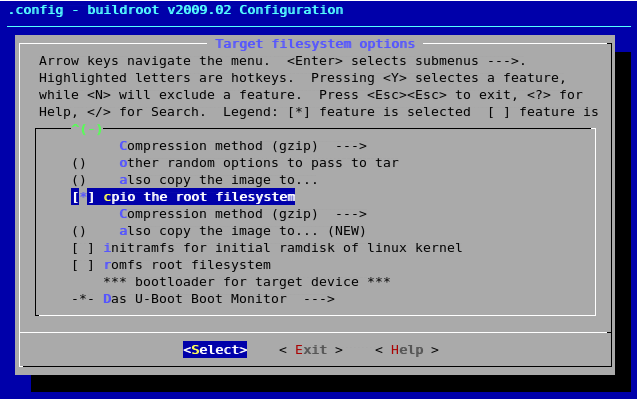
After the next call of make, the binaries-directory will have a rootfs.arm.cpio.gz generated. In newer buildroot versions these files will reside in the images-directory. If your project is called "adb4000g45", the following line will use this to generate a suitable ramImage:
$ build_arm/staging_dir/usr/bin/mkimage -A ARM -O Linux -T ramdisk -C gzip -a 0x71000000 -e 0x71000000 -n UpdateFS \ -d binaries/adb4000g45/rootfs.arm.cpio.gz binaries/adb4000g45/ramImage
In newer buildroot versions the mkimage executable is found under output/host/usr/bin/mkimage
In most of our projects a script called create_ramImage.sh is delivered in the main buildroot directory which generates a suitable ramimage in the output/images directory.
For other project-names the filenames have to be modified accordingly.
The Kernel uImage generated by buildroot, is needed too.
preparing the SDCard
After generating the needed files, the files uImage and ramImage from within binaries must be copied to a FAT-formatted SD-Card. The card should have a partition-table, to prevent problems. If such a card is then inserted into the board before booting, the uImage and ramImage will be used.