Programmers
ICprog OpenOCD
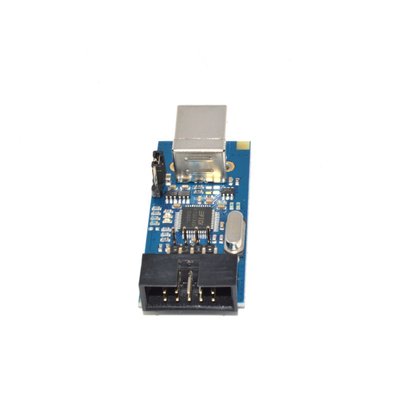

The ICprog OpenOCD is a USB JTAG adapter for OpenOCD. It drives every ARM board from In-Circuit and carries a TTL UART on a second pin header alongside the JTAG connector — programming and listening on one cable.
| Version | Contents | Part number |
|---|---|---|
| ICprog OpenOCD JTAG adapter | The bare board | 901.228 |
| ICprog OpenOCD + enclosure + cable set | Adapter in an enclosure, with matching cables | 902.103 |
The enclosed version additionally contains the enclosure and the cable set; the bare board is intended for permanent installation in a test fixture.
Features
- USB JTAG adapter for OpenOCD
- Standard 2 × 5 pin header for ARM JTAG
- Additional pin header with TTL UART
- Compatible with all ARM boards from In-Circuit (ICnova SAM9G45 OEM, ICnova i.MX353 OEM)
Documents and guides
- ICprog OpenOCD schematic
- JTAG via OpenOCD — how to use it
Drivers on Windows
On Windows the matching libusb-1.0 (WinUSB) drivers are needed:
- Go to zadig.akeo.ie and download the current Zadig release.
- Plug in the adapter.
- Run
zadig.exe— confirm the User Account Control prompt. - If the device is not in the list, enable Options › List All Devices.
- Select Dual RS232 in the list.
- Choose the WinUSB driver in the right-hand selector.
- Click Install Driver or Replace Driver and confirm.
The adapter reports two interfaces (interface 0 and interface 1); the driver must be set for both. If one is left without a driver, OpenOCD detects the device but cannot address the JTAG interface.